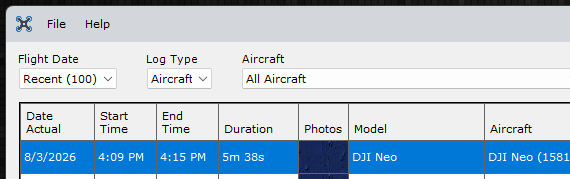
My original NEO log start and end time is not correct. I’m in Canada so the logs are automatically imported from the DJI server. The log times are correct on my free AirData account. I have tried importing the original file from the AirData account, deleting the incorrect log in Flight Reader and then re-importing and even importing the original txt file log from the Flight Log folder on my iPhone but all result in the same problem - the wrong start/end time. The Neo was controlled with the iPhone (iPhone was the controller).
AirData displays 1:09PM EST but on reflection I think that time is not even correct. If I remember correctly the time was around 2 to 2:30 PM, so I am not sure what is going on with the log. I know that I was not able to get a solid GPS signal but that hasn’t caused this kind of problem with the time stamp before.
The flight log file is named FlightRecord_2026-08-03_[16-09-35].txt. Assuming the time on your local device was accurate, that means the flight took place at 4:09 PM local time.
I’m not sure how AirData determines the local flight time, but it doesn’t appear to be correct since it’s showing 1:09 PM.
Flight Reader isn’t able to determine the local time because the flight log doesn’t contain any location data. It normally uses the first recorded GPS coordinates to determine the time zone offset. Since those coordinates are both zero in this flight log, Flight Reader falls back to displaying the UTC time instead, which is why it shows 8:09 PM.
Ok, thanks for the explanation of why the time is off. It makes more sense now. I think the AirData time is off too as the flight took place mid afternoon between 2:30 and 3:00. It’s not a big deal that the time is off. I’ll just note it in the flight details. Also in DJI’s Flight Data Centre the Distance data is 0m which is incorrect as the drone followed me for more than 5 minutes along the trail so even the data in the Data Centre is incomplete.
Thanks for time and effort in looking into this flight. It was appreciated.
That flight log has a Unix timestamp of 1785787775866, which corresponds to 4:09:35 PM EDT in Anten Mills, Ontario.
AirData’s time isn’t actually incorrect. It’s simply displaying the time using a UTC-7 offset instead of your local time zone. I’m not sure why they chose a UTC-7 offset though.
Yu do realize that Ontario uses two time zones: Eastern Time and Central Time, with most of the province observing Eastern Time. So any time deviation might be caused by you thinking one time zone and the drone using the other time zone…
You may be right because right after the flight when we drove down the road a bit to a local grocery store, I remember checking my watch and it was around 4:30, so it was likely 4:09 when the flight ended.
Yes, but I am in EST zone and I was flying the NEO with my iPhone which had the correct time zone. In addition, the NEO has always been flown in the EST zone since it was purchased so that should not be a factor in this case.
A DJI drone primarily gets its accurate time stamps and Coordinated Universal Time (UTC) directly from GPS and GNSS satellites via its onboard flight controller. Where it is or where is from matters little, it only cares about where it “thinks” it is…
When a connection is established, the satellite data aligns the internal system clock, flight logs, and high-precision hardware modules like RTK.
An RTK drone uses Real-Time Kinematic satellite navigation technology to achieve pinpoint, centimeter-level location accuracy. It relies on a ground base station or correction network to fix standard GPS errors instantly while flying
I di not know if this link helps or not, it address the android, not an iPhone…
@LoudThunder the SDK link you shared is referring to getting the time of media files (images or video), so I’m not sure it applies here. However, DJI does state that specific time comes from the Android (or Apple) device here:
The MSDK R&D team reported that the timestamp from GeneratedMediaFileInfo.getCreateTime() originates from the Android device
It seems unlikely that the time could come from the onboard flight controller, even more so since the flight log in this case had no GPS data available. Is that mention from AI, or did you find it on a DJI website or in DJI documentation?
I acquired that information from the link I provided earlier and the two attached links below. There were some other postings I also read and I kind of put it all together, I hope I did not mix it up too bad…
That new version worked, now the flight time is accurate. Thanks!!
There are still some parts of the flight log that are still not correct, like the Max Distance which registers 0.0m. Even though the GPS reception wasn’t good, I would have thought that the VPS would have been able to give an indication of how far the distance was travelled.
@chrislaf VPS is only able to measure the distance between the bottom of the drone and the nearest obstacle below, and only when the sensors are within range.
Ok, thanks. I was thinking of an old Tello app I occasionally use (TelloFpv) when I fire up my old Tello that has rudimentary logs that tell how far a Tello flight has flown. The Tello only has VPS.