Hi,
I caught the wall with my props at about 3 foot high, so the mini4 crashed. Now the right stick only sends it upward. Luckily the left stick still brings it down.
Any ideas?
C
Hi,
I caught the wall with my props at about 3 foot high, so the mini4 crashed. Now the right stick only sends it upward. Luckily the left stick still brings it down.
Any ideas?
C
If you have not damaged the drones innards and really only damaged the props, be sure to replace them in pairs, for example if you only chip one prop on the right front strut, replace both propellers on that motor… they come in a sealed pack and they come from the same mold and lot number and they are for all intents and purposes a balanced pair… replacing only the damaged prop with a new one and if there is an imbalance, the motor will shake something furious at max RPM (Over 10,000 RPM).
Next check for something that could affect the obstacle avoidance. Maybe even disabling it to test it.
Check every screen in your settings. Look for anything weird and not by the book… Make sure you are still in the flight mode you expect… Most flyers us Mode 2… Left stick (throttle-height and Yaw-turning in circles) and the Right Stick (Pitch-Forward and Back and Roll-Right and Left)… Check your setting in the Menu…
And in the progressive setting, keep everything normal as in Reset…
Other than that, I am at a loss.
I know this does not help, but I have been there myself… I was flying in my back yard, under a low branch of the dogwood and when I got to the fence, I quickly gave my drone full Up to climb over the fence, but I pushed the wrong stick and she ran straight into the fence and I shortened all four front propellers… Luckily that was the only damage…
Do you have any insurance on it? Allstate, Squaretrade, etc… If you do and you cannot figure out the issue, I would send it in… Both of the above have served me well…
Good Luck!
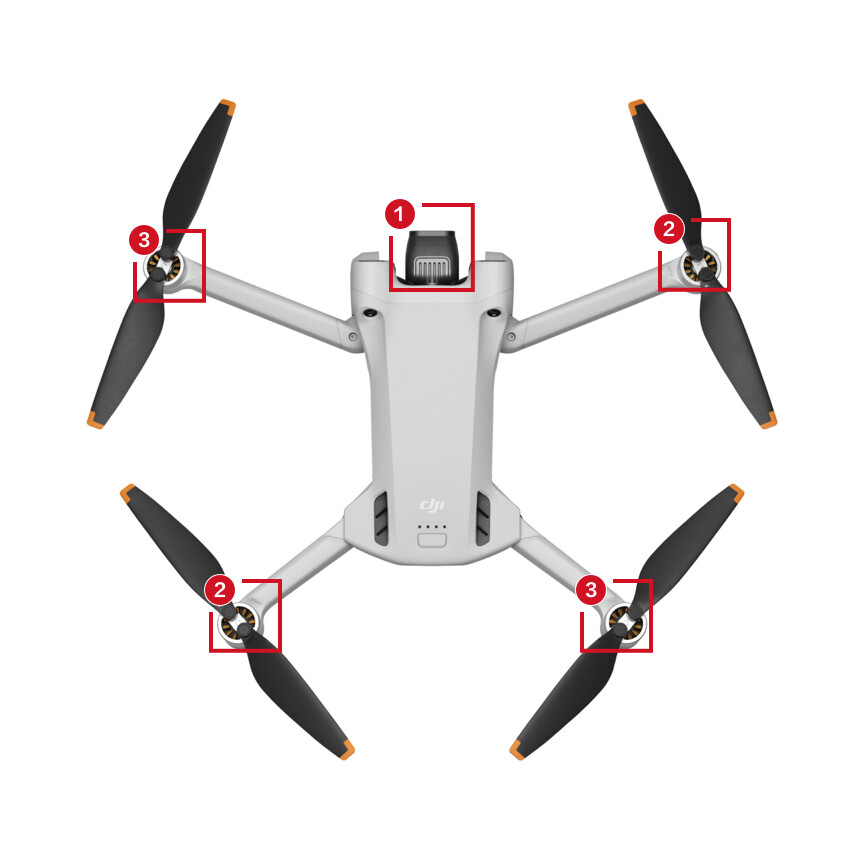
And make sure you put the right prop(s) on the right motor(s). The motors are paired with their opposites and each pair is counter-rotating relaitive to the other. The props have a mark to tell you which pair they go with. In the case of the mini4 I believe it is a raised bump. Others may have black/silver rings or dots.
On the mini4 the props with raised marks go on the fore/stbd and aft/port motors (#2), and the ones without the bumps go fore/port & aft/stbd (#3).
Installing props with incorrect pitch for the motor rotation direction can result in unpredictable flight behavior.
Hi L,
I was playing indoors, and only clipped the wall, and a gentle spin down 3 Ft to the carpet, so no damage.
I fly mode 2.
No insurance.
I got advice from another forum, to do a re-calibration, that fixed it, so all’s good.
Cheers, C
Hi P,
I bought a min4 pro for spares, and used the front right props, from the front right, so by accident, I got it correct.
Thanks, C
Every time you fly, always check your drone over, and since you re-used prop screws, they may have a tendency to back out, just make sure they stay tight.
Hi L,
I am a bit lax when it come to the check, but it would only take a few seconds.
I notice that the later ones use a kind of bayonet fitting.
C
I think the bayonet fittings are better and I think they prevent you from installing the props on the wrong arms…
Agreed, and some but not all do indeed prevent or at least make it harder to do it wrong.
I bought my first “drone” from a thrift store; it looked like a flying saucer. The six propellers were enclosed inside the circular frame and it came with spare props, no instructions… I smacked a fence and broke a couple of propellers, no problem, I had spares… but I did not realize that some rotated clockwise and some counter clockwise… And when I fired it up again, it flopped around on the ground like a landed fish trying to get back into the water…  After I googled the toy, I learned the reason, wrong props on those motors… I never made that mistake again…
Hi,
I used to make them, and had to wire each motor and fit all props correctly.
C