My Mavic Air has the front leds showing red all the time when on.
refreshed the drone and calibrated the sensors on assistant 2, still there.
Any advice please
My Mavic Air has the front leds showing red all the time when on.
refreshed the drone and calibrated the sensors on assistant 2, still there.
Any advice please
Can you share the full backstory? Has anything notable happened with your Mavic Air since the last time everything was working as expected? For example, did it crash or take any damage?
Also, what do you mean by “refreshed the drone”?
If there are any other details that might help, please share those as well.
Hello
No crashes, no damage. I have done am IMU and Compass calibration. On assistant 2 I checked the aircraft firmware and took the option to refresh the firmware,
When the aircraft and controller are connected, (I used an iPad mini as the viewing screen). The aircraft frequently disconnects.
When powered up the aircraft front leds are always on RED. I believe this is a critical condition, but cannot find what to do about it. DJI no longer support the Mavic Air. Stuggling to find a company to do a diagnostic/repair.
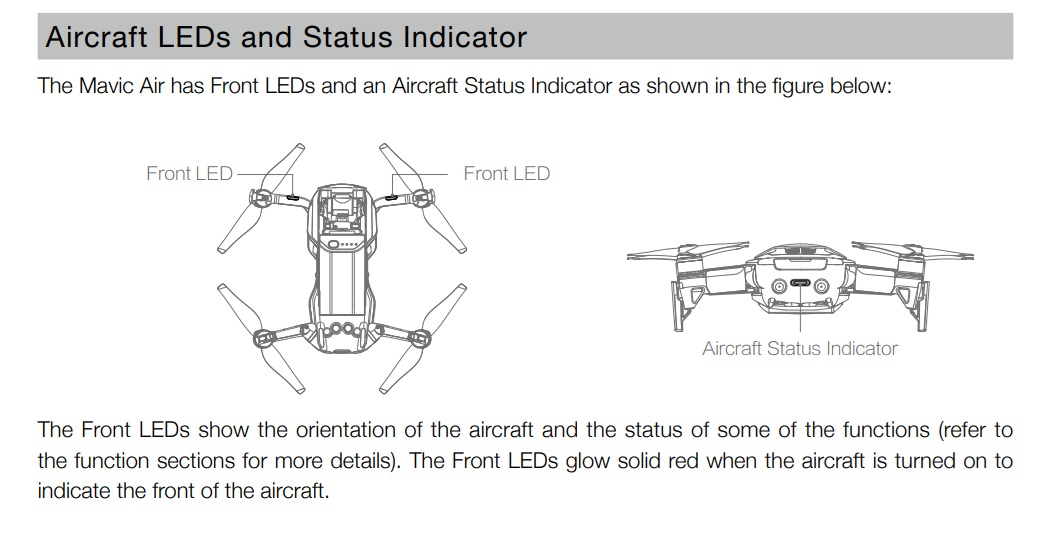
Solid red lights on a DJI Mavic can mean different things depending on which lights you’re seeing. However, as for the Front Arm LEDs; on most Mavic models, the front LEDs remain solid red by default during flight. These are “head LEDs” intended to help you identify the drone’s orientation (red usually indicates the front).
Under Normal Behavior, they stay red while the drone is powered on. However, you can customize them and you can often turn these off in the DJI Fly or GO 4 app settings if they interfere with photos or videos.
This video is for the Mavic 2, but the information for the model should be the same…
Solid red lights on a DJI Mavic can mean different things depending on which lights you’re seeing. However, as for the Front Arm LEDs; on most Mavic models, the front LEDs remain solid red by default during flight. These are “head LEDs” intended to help you identify the drone’s orientation (red usually indicates the front).
Under Normal Behavior, they stay red while the drone is powered on. However, you can customize them and you can often turn these off in the DJI Fly or GO 4 app settings if they interfere with photos or videos.
Thank you for your reply,
The DJI drone I’m referring to in my original post is the Mavic Air. In the Mavic Air user manual, a solid red means ‘Critical error’
This is the advice I’m trying to find out about, and what to do.
I have connected the aircraft to Assistant 2.
Done a factory reset, recalibrated the forward,rear and downward sensors.
Recalibrated the IMU, camera gimbal and the joysticks on the DJI GO 4 app.
I’m afraid I’m still at the stage of critical front red light error showing and frequent disconnection between app and aircraft.
Could this now be a hardware problem? Do you have any recommendation to go forward on this problem please?
You originally wrote…
“My Mavic Air has the front leds showing red all the time when on.”
You know, I spent my time instructing you that the RED LEDs on the Front Legs are what is to be expected… Perhaps you do not know your front from your back…
But I will take one more crack at helping you… Here is the information right out of the Mavic Air Manual…
RED on the Front Legs is Normal…
And here is the link for the whole User Manual…
https://dl.djicdn.com/downloads/Mavic%20Air/20180525/Mavic%20Air%20User%20Manual%20v1.2.pdf
@TOMMYP26133 could you confirm whether you’re referring to the front or back lights? Also, do you see any error messages in DJI Fly?
What changed between now and the last time your Mavic Air was working as expected? I’m just trying to get a better sense of when it last worked properly and whether anything notable might have happened since then.
Original post did say front red lights, thank you for your replies. I stand corrected Indicator lights are the rear ones. So my problem is the controller intermittently disconnects from the DJI Go 4 app on the iPad mini screen that I use. Can this be a hardware failure of the controller? I shall try another controller in the coming week and will report back.
Thank you all for your patience and knowledge.