I’m excited to introduce Flight Reader Web, a new browser-based version of Flight Reader for viewing and analyzing DJI flight logs.
Flight Reader Web allows you to upload your DJI flight logs and explore your flights from nearly any device without installing software. You can view flight paths on an interactive map, examine detailed flight data, review important events along the flight timeline, organize flights with tags and comments, and export your data in several common formats.
The web version is separate from the existing Flight Reader Windows application, which will continue to be available and supported. Flight Reader Web is simply another option for anyone who prefers the convenience of accessing their flight logs through a web browser.
You can log in here to create a free account:
Flight Reader Web is still new, so I’d really appreciate any feedback, feature suggestions, or questions you may have.
I have been exploring Flight Reader Web for a few days and really like it. I’m a current user of the desktop windows version.
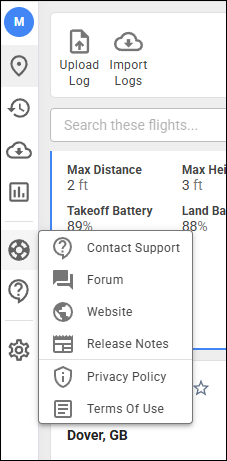
One thing that I have noticed that does not appear to be working yet is the links in the ‘Help’ menu (Life preserver). I’m not sure if this is a glitch or is something that is planned for a later date.
I see the same thing but, I am assuming that if I click on Contact Support it will open a support window with the option to either send an email message to you or post on this forum similar to your desktop windows version. It doesn’t do anything.
Similarly, none of the other items listed work either. For example: What is the Privacy Policy or the Terms of Use. When either is clicked nothing happens.
In the Flights panel right now there only appears to be one way to view flight records and that is the flight cards which I assume will get smaller as more flight records are added. I like the flight cards because they are easy to read and navigate but when it fills up with 10s of flights it might get harder to navigate. Having the option to convert the ‘flight cards’ to a list similar to the desktop version has currently would be handy.
Since Flight Reader Web cannot import CSV flight logs, is it possible to make a manual flight log input button where a user can manually input a few important fields like Pilot, Aircraft, Location, Start time, End Time, Battery, Weather, etc.
Yes, they all work now. Thanks for fixing that. This is my second try, trying to reply directly to your previous reply rather than it just going into the main thread stream.
Have you tried the filters and search above the flight cards? You can narrow down the list by timeframe, or search for things like a model name, aircraft name, pilot name, location, or any combination of those details.
It would be possible to allow manual entry. However, there wouldn’t be a way to enter enough detail to make those flights especially useful. You’d have a basic record of each flight, but no in-depth flight data to review.
I have tried the search fields and the search terms are the same/similar to your desktop version. As I use the Web version more I’ll have to see how the panels change with the number of flights added. Right now I only have 4 flights in there so they are still full size.
I can live with not having to enter CSV flights into the new Web version. I still have the desktop version which at this time is still my primary flight logging app and it does handle CSV files although I have to import them manually.
Could you tell me more about a scenario where you’d want to scroll through dozens of flights? What would you be trying to accomplish?
It seems like filtering or sorting those flights might make it easier to find what you’re looking for, but I’d like to better understand how you’d use this.
I guess I am just thinking about how your desktop version lists flights in a list format. I actually like the format in the Web version better and probably am over-thinking it. Probably just an adjustment phase. I had the same thing when I went from AirData to your desktop version.
Yeah, the web version is a little different. Well, I guess it’s actually quite a bit different. Once you have dozens of flights, try the options I mentioned and see how they work for you. If you find that the experience isn’t working well for your workflow, just let me know what you think could work better.
Although, I haven’t made a final decision, I’m already liking what I’m seeing. I have always liked a more graphical interface and I find the Web version has a fresh modern look with all the features from your desktop version and more.
I set up myself as the default ‘Pilot In Command’ in the Settings panel and it will designate me as that role when I import a flight but it will not fill in my first and last name as a crew member as your desktop version did. I have to do it manually for every single flight log I import. When I eventually upgrade to the plus version and set up auto syncing from the DJI cloud this will become tedious with multiple logs synced at once. Is there a way to have the ‘Crew Members’ set to a default if they are always going to be the same?
One other issue, that Neo log you worked on a few weeks ago that was not displaying the correct local time in the desktop version that you fixed is not displaying the correct local time when imported into the web version. It is not an issue for me but just letting you know if it is something you might want to know about.
Here’s that Neo log file is case you want to investigate.
I seem to be stuck in an infinite loop trying to access the flight log viewer. I click on “Upload Your Flight Log” and I am sent to a page that asks for me email address. I enter my email address and select “Log in with email”. I receive email with a link to “Approve Login Request”. I select that an am told “Your login request was approved”. When I try to access the log viewer, I am sent through all of these steps again.
I see the option to add crew members and I can add and save myself as a crew member but every single time I add a new flight record I have to add myself again as a crew member even though I saved myself as one the previous time. This does not happen with the Pilot In Command, that one sticks because it is set-up in the settings.
My name is in the Default Crew Member section of the settings for manually uploading flight logs but does not get added to the manually uploaded flight log as a crew member.