Is there a way to calculate the total flight time and/or distance by using the Flight Reader log?
In the Aircraft Log, you can scroll to the bottom of the OSD.flyTime column to see the total flight time for the flight. You can also scroll to the bottom of the OSD.mileage column to see the total distance traveled.
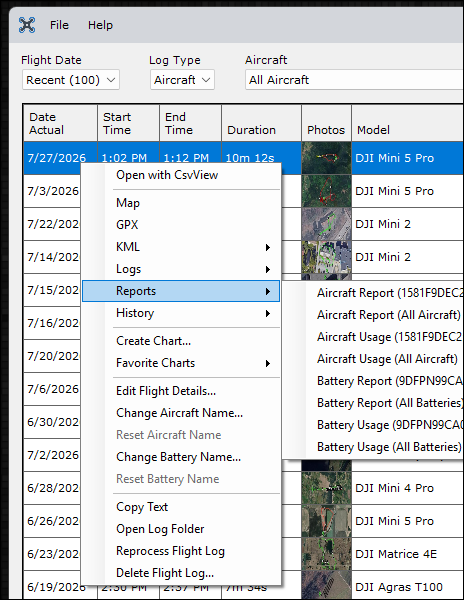
Another way to view this information is to right click a flight in the main Flight Reader window and generate either an Aircraft Report or an Aircraft Usage Report.
I am looking to import 3 years of flight logs, so I can see how many hours, distances etc…maybe a new thread needed
@fillipo53 after you import all of your flight logs, you can use the above reports to find those totals. A report can be run for all time or another timeframe of your choice.
Update: I think I just figured it out. Highlight all flight logs then right click in highlighted logs and select Reports>Aircraft Usage. Original Post….For some reason I am unable to produce a report that adds up the total flight time for a particular aircraft. All I get is a report of a single flight. I have tried highlighting all flights and still only get one flight in the resulting report. What am I missing?
Thanks, Mark
@mhammann57 Flight Reader is only able to generate reports for flights that have been imported into Flight Reader.
The first step is to select All Time from the Flight Date dropdown at the top of the main Flight Reader window and verify that all of the flights you’re interested in have been imported.
Also, if you highlight more than one flight, Flight Reader will generate a report only for those selected flights.
To generate a report for all flights for a particular aircraft, right click a single flight for the aircraft you’re interested in, then go to Reports –> Aircraft Usage (aircraft serial) –> All Time.
Thank you msinger! Great support! Much appreciated!
Mark
1 Like